from inspection to closing
CASE STUDY • AI-Tools • claude • cursor • next.js

About
Goal
DataFox taught me something uncomfortable: I didn't really know what I had built. The vibe coding workflow was fast, but it left me disconnected from the mechanics — unsure of the code quality, too reliant on dropping a PRD in and hoping for the best. HomeScope was the course correction. Still using LLMs to generate prompts, but far more deliberate — building prompt by prompt, staying close to every decision, understanding what was actually happening under the hood. Security was intentionally left out of scope. That's next.
The goal of HomeScope was fourfold: identify a real-world problem worth solving, get hands-on with a different set of AI tools than DataFox used, push the product as far as functionally possible to a live URL, and honestly evaluate what this workflow did better — and worse — than the last one.

ON GENUINE VS GENERATED
.png)
There's a word getting thrown around a lot right now: slop. AI-generated work that looks like everything else, built without thought, shipped without care. Fair enough — but the definition deserves scrutiny. Is it slop if it looks like other products but solves a genuinely unique problem? Is it slop if the code isn't perfectly optimized but still works, still ships, still delivers value? Are we over-indexing on pristine Figma files and clean architecture in an industry that iterates every other week anyway? Is it slop if it's an honest experiment you learned something real from? Here's my definition: slop is something that imitates without delivering, claims to work and doesn't, has no genuine goal behind it. Slop is the AT&T rep who walks you through an entire quote process and hangs up the moment you don't buy — not because they couldn't help, but because they never intended to. That's slop. A fundamental disrespect for the person on the other end. HomeScope isn't perfect. But it's genuine, it's functional, and it was built to actually solve something. That's the line.
TOOLS THAT CLOSED THE DEAL

I wanted to lay the foundation to ensure that “Slop” didn't have to be the case — so before Cursor wrote a single line of UI, the stack was split into deliberate layers. Figma defined the visual identity via design tokens, exported directly into Cursor through the MCP plugin. shadcn/ui handled how components behave. Next.js and Vite provided the application and build layer. Claude served as the reasoning layer throughout — stress-testing the data model, clarifying architecture decisions, and generating structured prompts for Cursor to execute. GitHub handled version control, Google Docs captured insights, documentation, and everything in between, and Vercel handled deployment — connected directly to the GitHub repo so every push to main triggered an automatic redeploy, keeping the live URL current without any manual intervention. ChatGPT — after starring in DataFPox — watched from the sidelines. HomeScope was a Claude and Cursor production from start to finish.
THE REPORT LANDS, THE CHAOS STARTS

A home inspection report doesn't end the conversation — it starts one. Agents receive a dense, inconsistent PDF and are immediately expected to sort through the noise, identify what actually matters, communicate it clearly to buyers, sellers, and contractors, and manually track every outstanding issue until the deal closes. There's no system for any of it — just emails, texts, and memory filling the gap between a static document and a very dynamic process. On every single deal.
THREE PARTIES, ONE SOURCE OF TRUTH

HomeScope addresses this by doing three things: extracting and structuring inspection data automatically so agents aren't manually sorting through PDFs, surfacing that data in a shared report that gives every party controlled, appropriate visibility, and tracking outstanding issues so nothing falls through the cracks between the inspection and the closing
KEY FINDINGS

Designing around the agent persona surfaced a set of questions that don't have obvious answers — do the same contractors rotate across multiple properties, or is every relationship one-off? Does a finding marked "Needs Repair" actually require remediation, or is it negotiable? Are there findings legally or code-required to be resolved before a deal can close? How much of the agent-contractor conversation should a homeowner see — and how much is intentionally opaque? How many active properties is a typical agent managing at once? Can previously verified findings be re-examined if new information surfaces? Do multiple agents ever collaborate on a single property? These aren't edge cases — they're the core complexity of the domain, and getting the persona model right meant sitting with all of them before designing anything around them.
THE AGENT’S RED PEN
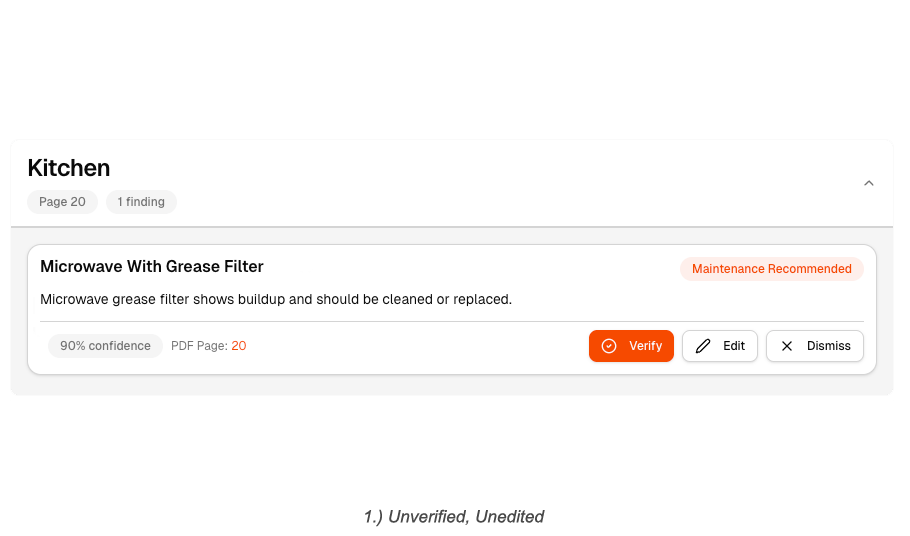
In its default state, the finding summary card surfaces everything the agent needs to make a decision — the component, the AI-extracted description, a confidence score, the source PDF page, and three actions: verify, edit, or dismiss. It's designed for speed — the agent should be able to move through findings without drilling into each one unnecessarily.
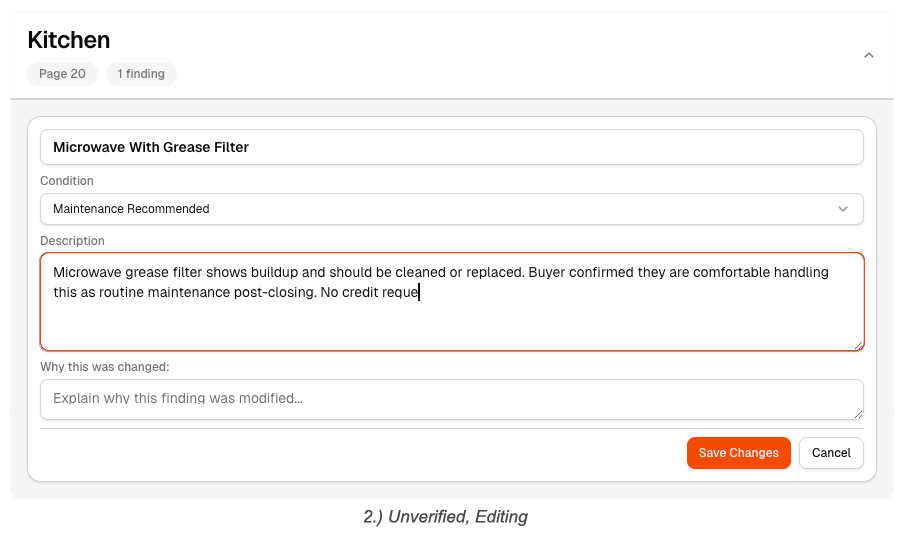
If something needs correction, the edit state opens an inline form directly on the card — the agent can update the condition, rewrite the description, and leave a timestamped edit note explaining the change. The AI got it mostly right. The agent cleans up what it didn't.
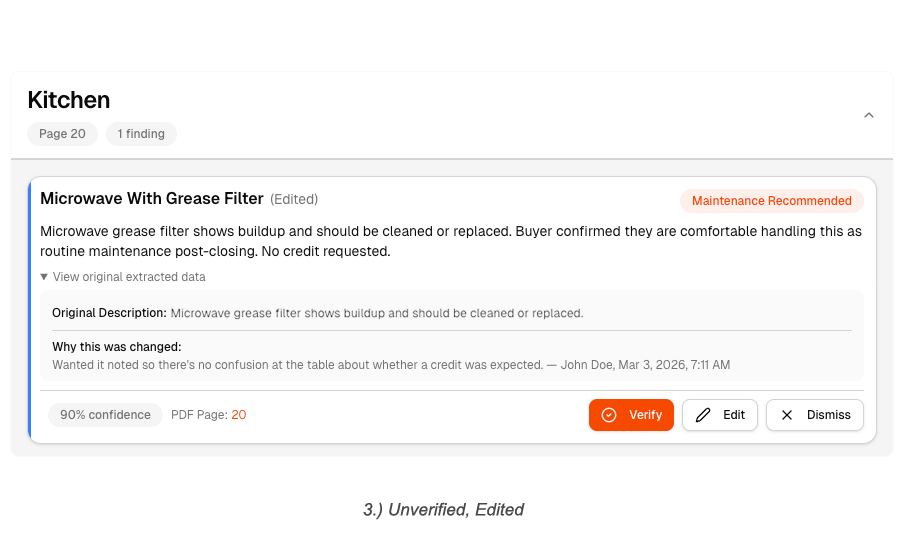
After saving, the card returns to a summary view — but now carries the weight of what changed. An "Edited" flag appears alongside the updated condition, and the card exposes two additional affordances: view the original extracted data and review the edit history. The finding is still pending verification, but the record of how it got here is fully transparent.
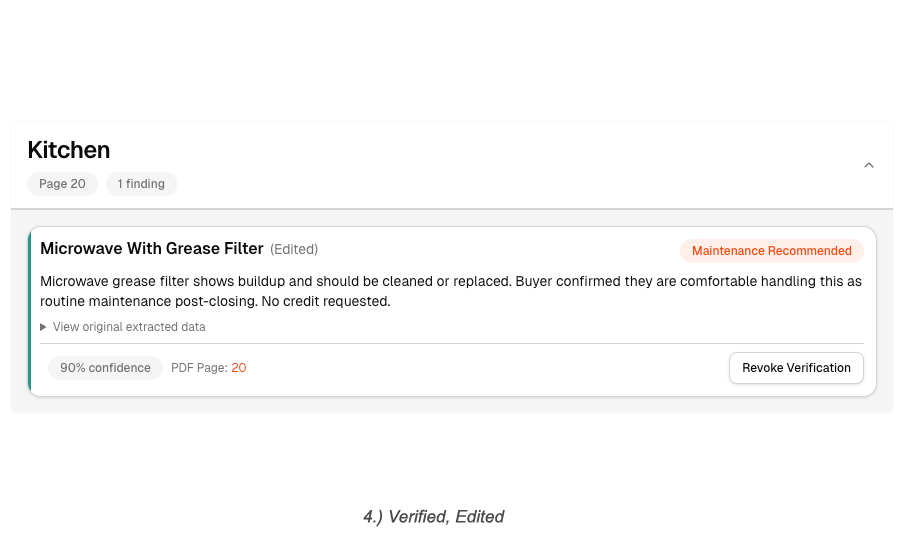
Once the agent is satisfied, they lock it in. The finding moves into a verified state — confirmed, edited where necessary, and ready to be surfaced to the buyer. The full audit trail stays intact underneath.
WHAT NEEDS ATTENTION BEFORE COFFEE

The central question driving the dashboard design was simple: what does an agent need to see the moment they log in? The answer was always the same — which properties need my attention today, and why. That meant designing around activity, not structure. The dashboard surfaces a live feed of what's changed — new comments from homeowners or contractors, issues flagged or resolved, findings that have shifted status — each item answering the questions an agent actually has: who said something, on which property, on which finding, and how long ago. Recent properties and pending documents round out the picture, so the agent knows exactly where things stand and who they're waiting on before they've clicked a single thing.
BORROWING FROM THE BEST
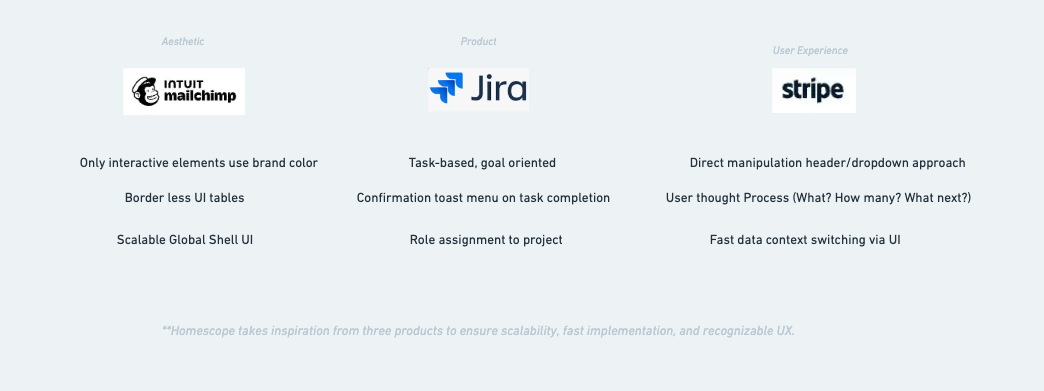
HomeScope didn't come from nowhere. The task assignment and queue logic draws from Jira — the idea that work items have owners, statuses, and priority. The notion of dropping pins on a blueprint to anchor a discussion to a specific place came from Figma. The global shell, navigation structure, and some of the visual tone took cues from Mailchimp. Stripe informed how data and status are communicated clearly without overwhelming the user. And Lovable and Cursor — the tools used to build it — served as reference points for how modern AI products are thinking about monetization and usage-based pricing.
Between the Prompts

One thing Cursor makes immediately clear: the work doesn't happen in the prompts — it happens between them. While waiting on a generation, the time went into documenting decisions, researching edge cases, and reprioritizing what to tackle next. The case study outline you're reading was largely written in those gaps. Laundry was also considered. It did not make the cut.
THE CADENCE OF CODE

Building HomeScope required a different headspace than pure product design work. The rhythm that emerged was: discuss the next problem with Claude, clarify the intent until it was precise, generate the prompt, execute in Cursor, then refactor the code before moving on to the next thing. Repeat. What changed wasn't just the tooling — it was the thinking. Somewhere between DataFox and HomeScope, the mental model shifted from designer-who-directs to a hybrid that's equal parts product thinking and developer discipline. You can't just throw a prompt at a codebase and walk away. You have to understand what came back, clean it up, and make sure the foundation is solid before building the next thing on top of it.
SAME HOUSE, DIFFERENT FLOORS

At a certain point, managing the build started to feel less like prompting and more like running a team. Cursor allows you to spin up multiple agents simultaneously — so that's exactly what happened. Three agents, each named and assigned a distinct scope of responsibility. The senior agent handled larger, more complex backend concerns. The mid-level agent worked across both front and backend, bridging the two. The junior agent stayed focused purely on frontend implementation. They could be directed independently, or pointed at each other when a problem required coordination across layers. Operating this way meant thinking less like a designer executing tasks and more like a product owner managing a team — defining scope, delegating clearly, and making sure the right level of judgment was being applied to the right level of problem.
BACK AND FOURTH BEFORE THE HANDSHAKE

One of the more deliberate design decisions in HomeScope was treating each extracted finding not as a static data point, but as a living discussion. Inspired by forum-style interfaces — where unread threads are bolded and surface to the top — each finding becomes its own topic that parties can align around over time. This matters because a single finding rarely gets resolved in one exchange. There's back and forth, new information surfaces, opinions change. The agent needs to know when a new comment has been posted, who posted it, and whether the finding needs to be reprioritized as a result. By structuring findings as discussions rather than checklist items, HomeScope reflects how resolution actually happens — not as a single decision, but as a conversation with a conclusion.
FOUNDATION VS FINDINGS

A property has physical things that don't change — a roof, a foundation, an electrical panel. An inspection is something that happens to that property and produces findings about those things. HomeScope keeps those two ideas completely separate. The physical makeup of the property is just an organizational layer — it doesn't change because an inspector walked through. What changes are the findings attached to it, and whether those findings require action. An issue isn't a permanent characteristic of a component. It's a flag on a specific observation from a specific inspection. Keeping that distinction clean is what makes the dashboard logic, the verification flow, and the data model hold together.
USING WHAT FITS- UNTIL IT DOESNT
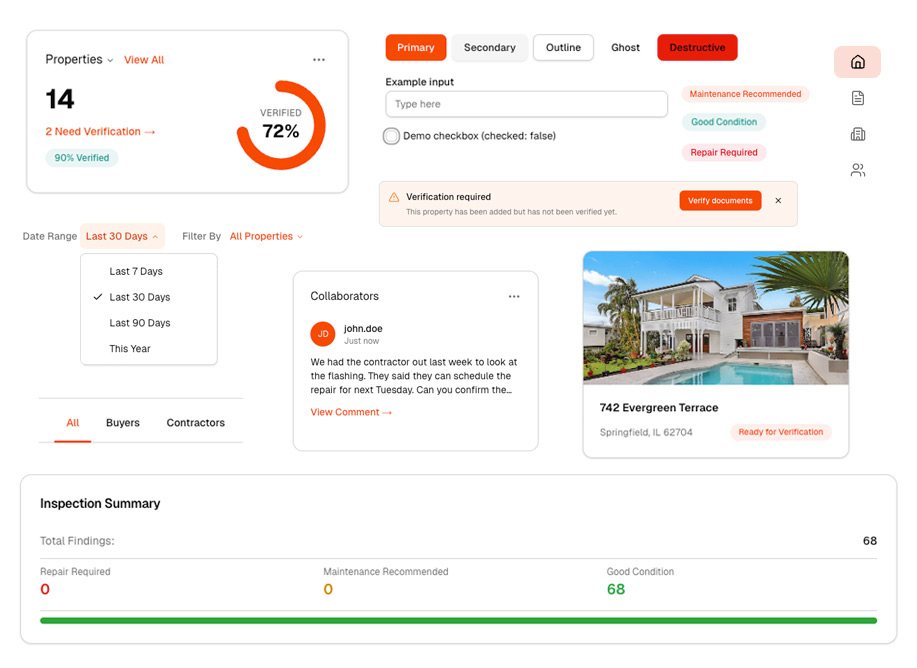
shadcn/ui was the component foundation for HomeScope, but using it well meant understanding it in Figma before touching Cursor. I mapped out the full component library in Figma first — getting familiar with what existed, what the defaults looked like, and where the boundaries were. From there I set up a component playground inside the Cursor project: a dedicated internal screen that rendered every component live, in one place, so there was always a visual reference to build from. Most of the product used shadcn components directly — navigation, tabs, tables, dialogs, badges. But there were places where the library's defaults didn't fit the product's specific needs, and forcing them in would have meant compromising the UX. Those components got custom treatment. The rule was simple: use shadcn where it fits, deviate where it doesn't, and never deviate just for the sake of it.
Reflection
It seems like we're in a doer economy now. The gap between knowing about something and actually building it has never been more visible — or more consequential. As AI continues to collapse the distance between idea and execution, the people who ship, iterate, and learn seem to be increasingly the ones who matter. What's less clear is where this leaves the interface layer — if AI agents can navigate software on behalf of users, the interface as we know it may be more transitional than foundational. But for now, something interesting has happened: the designer and developer role have quietly merged. The people building the most compelling products aren't waiting for a handoff. They're designing, prompting, shipping, and refining in the same breath. Taste has become the differentiator — not just aesthetic taste, but the judgment to know what to build, what to cut, and what actually serves the person on the other end.